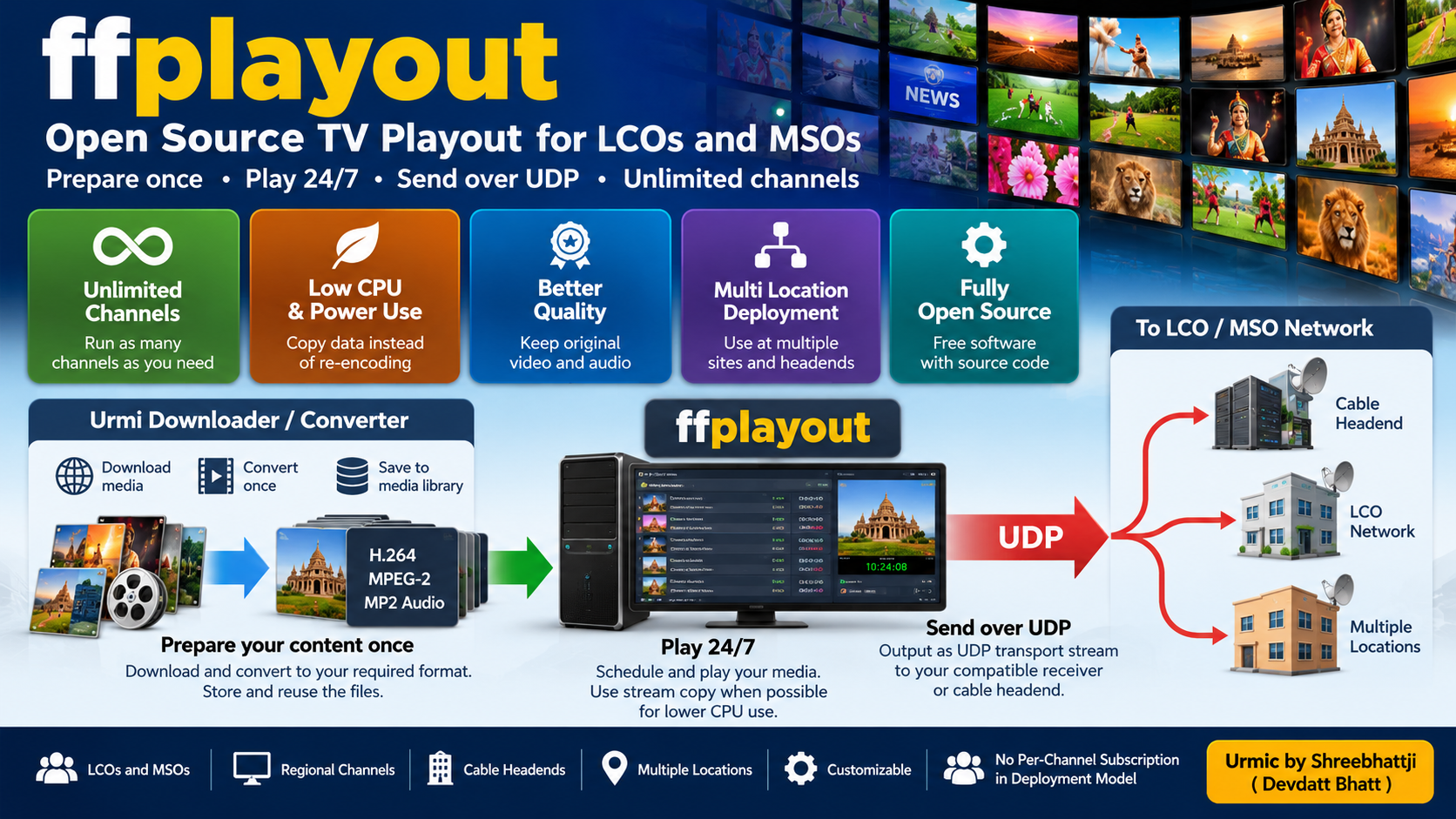
Run your own TV channels with Urmic’s customized version of ffplayout. It is designed for Local Cable Operators (LCOs), Multi-System Operators (MSOs), cable headends, and other broadcasters.
Play your licensed video content 24 hours a day, 7 days a week. Send your TV stream over UDP to compatible receivers and cable distribution systems.
Prepare your content once. Play it again and again.
Open-source software. Efficient media processing. Deployment across multiple locations. Build a TV distribution system that fits your needs.
Why Choose Urmic ffplayout?
1. Customized for UDP TV Playout
Urmic maintains a customized version of ffplayout for TV playout. It can send video as a UDP transport stream when configured with compatible FFmpeg output settings.
Connect your playout system to a compatible receiver or cable headend. Choose the output settings that match your broadcast equipment.
2. No Fixed Channel Licence Count in the Deployment Model
Plan your TV network with as many channels as your operation requires. Deploy channel instances on one or more servers. Add more servers as your network grows.
This approach is suitable for LCOs and MSOs that manage many TV channels. You can build your own system instead of depending on a separate commercial playout licence for every channel.
The practical number of channels depends on your server capacity, video format, bitrate, storage, and network. Test the required channel count and system stability before a large deployment.
3. Prepare Media Once Instead of Re-encoding Every Time
Repeated video conversion uses CPU power and electricity. It can also reduce picture and sound quality when lossy encoding is repeated.
Urmic combines ffplayout with the Urmi Downloader / Converter. Use the converter to download or prepare your media. Convert the files to your required broadcast format once. Store the prepared files and reuse them in your playlists.
When the files already match the required output format, compatible stream-copy settings can send the existing encoded audio and video data without encoding them again.
This can reduce CPU use, electricity use, and extra processing. It can also help preserve the quality of the prepared files by avoiding unnecessary re-encoding.
4. Save Electricity and CPU Resources
You do not need to convert every file again each time it plays. Prepare your media in advance and reuse the prepared files.
This can reduce processing work, CPU load, heat, and power use. It can help you operate more channels with your available hardware.
The result depends on the media format and output settings. When real-time conversion is required, additional CPU resources may be needed.
5. Keep Your Original Media Quality
Repeated lossy encoding can reduce video and audio quality. Preparing a file once helps avoid unnecessary quality loss from repeated conversion.
Use suitable source files and conversion settings to get the best results. The final quality depends on the original media and the selected settings.
6. Deploy Across Multiple Locations
Build your TV distribution network across different towns, cable headends, and operating locations.
Run channel instances on suitable servers at different sites. Use your existing network and storage where appropriate. Expand the system when your channel or coverage requirements increase.
Your deployment capacity depends on the available servers, network, and configuration. Plan each location according to its requirements.
Urmi Downloader / Converter
The Urmi Downloader / Converter helps you prepare media before playout. It provides a web interface for media downloading and file conversion. It also supports access to files through a Samba network share.
Prepare your videos, convert them to your required format, and save the results in your media library. Use those prepared files in ffplayout without repeating the same conversion work unnecessarily.
This workflow helps reduce repeated processing and makes media preparation easier to manage.
View the source code: Urmi Downloader / Converter
How the System Works
- Collect media: Add the video files that you have permission to broadcast.
- Prepare the files: Use Urmi Downloader / Converter to download and convert media into your required format.
- Create playlists: Arrange your prepared files in the required playback order.
- Start playout: Use ffplayout to play the scheduled content.
- Send the UDP stream: Deliver the configured output to your compatible receiver or cable headend.
- Expand your network: Add channel instances, servers, and locations as required.
Open-Source Software
The ffplayout source code is available for inspection and modification under its applicable open-source licence. Urmi Downloader / Converter is also available as source code. Please review the licence terms for each project before using, modifying, or redistributing it.
The software does not require a recurring per-channel subscription in this deployment model. Hardware, electricity, storage, networking, and other services may have separate costs.
You can study the source code, understand how the system works, and build a deployment that meets your technical requirements.
Explore the projects:
Who Can Use This System?
- Local Cable Operators (LCOs)
- Multi-System Operators (MSOs)
- Cable TV headends
- Regional TV channels
- Broadcasters that need scheduled video playout
- Organizations that manage multiple broadcast locations
Start Building Your TV Playout System
Use ffplayout to schedule and play your media. Use Urmi Downloader / Converter to prepare your files. Send compatible UDP streams to your broadcast network.
Prepare once. Reuse your media. Reduce repeated processing. Expand your TV network as your needs grow.
Explore the source code and choose the configuration that fits your channels, equipment, and network.